
1980s Indian Vintage Photo Prompt – AI Photo Editing Guide
How to Turn a Modern Photo into a Realistic 1980s Indian Vintage Photograph with AI
Old photographs have a special charm that modern digital images often cannot reproduce. The soft colors, natural film grain, slightly faded appearance, simple backgrounds, vintage vehicles, traditional clothing and authentic expressions can make an ordinary photograph feel like a precious memory from another generation.
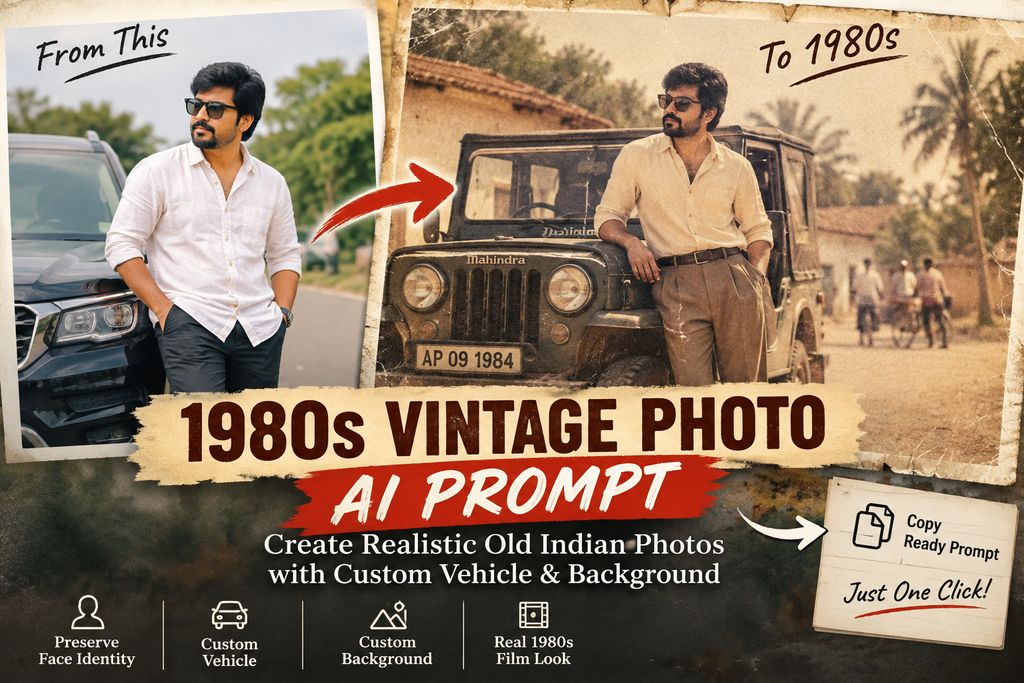
With modern AI image-editing tools, you can recreate this visual style using a reference photograph. The important part is giving the AI clear instructions about what should change and what must remain unchanged.
This guide explains how to create a realistic 1980s Indian vintage photograph while keeping the people in the original photograph recognizable and preserving their facial identity.
What Is a 1980s Vintage AI Photo?
A 1980s-style photograph is more than simply adding a sepia filter.
A convincing vintage recreation should combine several photographic characteristics:
- Analog film appearance
- Natural film grain
- Slightly faded colors
- Soft contrast
- Mild lens softness
- Natural skin texture
- Warm photographic tones
- Subtle film imperfections
- Slightly aged photo-paper appearance
- Period-appropriate vehicles
- Period-appropriate surroundings
- Realistic lighting and shadows
The goal is to make the final image look as though it was actually photographed during the 1980s rather than digitally transformed using a simple filter.
The Most Important Part: Preserve the Face
When editing an old-style photograph with AI, one of the biggest problems can be unwanted changes to the person’s face.
The AI may sometimes:
- Change facial proportions
- Alter the eyes
- Change the nose
- Modify the jawline
- Change the hairstyle
- Make the person look younger
- Make the person look older
- Apply artificial beauty effects
- Generate a different-looking face
For a family photograph or personal memory, these changes can completely alter the character of the original photograph.
Therefore, the prompt should clearly tell the AI that the uploaded photograph is the primary identity reference.
The instruction should emphasize that the people should remain recognizable and that the requested changes are mainly related to the environment, vehicle and photographic appearance.
How the Custom Vehicle and Background System Works
One useful way to create different versions of the same photograph is to separate the scene into two customizable fields:
Vehicle
You can specify almost any suitable vehicle.
For example:
- Classic 1980s Mahindra Jeep
- Vintage Hindustan Ambassador
- Classic Royal Enfield Bullet
- Old Indian scooter
- Vintage Premier Padmini
- Classic Indian bus
- Old agricultural tractor
- Period-appropriate bicycle
Background
The background can also be changed independently.
For example:
- Rural Andhra Pradesh village road
- Old South Indian town street
- Railway station
- Traditional Indian house
- Vintage photography studio
- Village marketplace
- Old school building
- Agricultural field
- Temple surroundings
This means you don’t need to rewrite the complete prompt every time.
Simply change the Vehicle and Background values.
Where Is the Prompt?
Use the Prompt Tool Here
The interactive prompt generator should be placed separately from the article content, preferably immediately after this introductory section or after the section explaining vehicle and background customization.
Recommended placement
Article introduction
↓
How the AI photo works
↓
Face preservation explanation
↓
1980s Vintage Photo Prompt Generator
↓
How to use the generated prompt
↓
Vehicle examples
↓
Background examples
↓
Tips for realistic results
This keeps the article clean while giving users an obvious place to generate and copy the prompt.
The prompt generator should contain:
Vehicle:
Classic 1980s Mahindra Jeep
Background:
Rural Andhra Pradesh village road in the early 1980s
Then the tool automatically generates the complete AI prompt.
The user can change either field and immediately generate a new prompt.
The Copy Prompt button should copy only the generated prompt, without copying the article text, headings, vehicle label or other interface content.
Why Vehicle Selection Matters
A vehicle can strongly influence whether a vintage photograph looks believable.
For example, placing a modern SUV into an otherwise authentic 1980s village scene can make the image look historically inconsistent.
Instead, choose a vehicle that visually belongs to the requested period.
For an Andhra Pradesh village scene, a classic jeep can create a very different visual impression from a vintage scooter or Ambassador car.
The vehicle should also interact naturally with the environment.
For example, the AI should consider:
- Correct vehicle proportions
- Correct perspective
- Realistic wheels
- Natural shadows
- Appropriate reflections
- Correct lighting
- Proper placement relative to people
- Appropriate road or ground contact
The vehicle should look like it was actually present when the photograph was taken.
Choosing the Right Background
The background is equally important.
A realistic vintage image should not look like a modern photograph with an artificial old background pasted behind the subject.
Instead, the people, vehicle and environment should share:
- Similar lighting
- Similar perspective
- Similar depth of field
- Matching shadows
- Matching atmospheric conditions
- Consistent photographic texture
For example, if the requested background is an old village road, the scene can include period-appropriate elements such as traditional houses, trees, bicycles, roads and other environmental details.
The background should support the historical appearance without distracting from the people.
Example 1: Andhra Pradesh Village Photograph
Vehicle:
Classic 1980s Mahindra Jeep
Background:
A rural Andhra Pradesh village road in the early 1980s with traditional houses, large trees, bicycles and warm afternoon sunlight.
This combination can produce a nostalgic rural family-photo appearance.
The important instruction is that the AI should preserve the people from the reference image while adapting the surrounding scene.
Example 2: Vintage South Indian Town
Vehicle:
Vintage Hindustan Ambassador
Background:
An old South Indian town street from the early 1980s with traditional shops, bicycles, simple buildings and natural daylight.
This gives the photograph a more urban historical atmosphere.
The vehicle, buildings and surroundings should all visually belong to the same period.
Example 3: Vintage Motorcycle Photograph
Vehicle:
Classic Royal Enfield Bullet motorcycle
Background:
An old South Indian residential street in the 1980s with traditional houses, trees and a simple village-town atmosphere.
This type of scene can work well for individual portraits or small family photographs.
Example 4: Railway Station Scene
Vehicle:
Classic 1980s Indian railway-era vehicle
Background:
A vintage South Indian railway station environment from the early 1980s with old architecture, railway platforms, bicycles and period-appropriate surroundings.
The AI should maintain consistent lighting and perspective between the people and the environment.
Example 5: Vintage Studio Portrait
Vehicle:
Classic 1980s Indian jeep
Background:
A traditional Indian photography studio setting inspired by the early 1980s with a simple painted backdrop and soft studio lighting.
This creates a more formal old-family-photo appearance.
How to Use the Generated Prompt
1980s Vintage Photo Prompt
Create a custom AI photo-editing prompt
Using the prompt generator is simple.
Step 1: Upload Your Reference Photograph
Choose the photograph containing the person or people you want to preserve.
Use a reasonably clear photograph whenever possible.
A clearer reference image generally gives an image-editing model more visual information to work with.
Step 2: Enter the Vehicle
In the Vehicle field, type the vehicle you want.
For example:
Classic 1980s Mahindra Jeep
Step 3: Enter the Background
In the Background field, describe the environment.
For example:
Traditional Andhra Pradesh village street in the early 1980s
Step 4: Generate the Prompt
The tool automatically creates the complete prompt using your selected vehicle and background.
Step 5: Copy the Prompt
Click Copy Prompt.
Only the generated prompt should be copied to your clipboard.
Step 6: Paste It into Your AI Image Tool
Paste the complete prompt into your preferred AI image-generation or image-editing tool together with the reference photograph.
Why a Detailed Prompt Is Better Than a Short Prompt
A short instruction such as:
“Make this photo look like the 1980s.”
may produce inconsistent results.
The AI has to decide:
- What should happen to the face?
- What vehicle should be used?
- What background should be used?
- How old should the photograph look?
- What type of film should be simulated?
- How should the lighting work?
- Should the colors be faded?
- Should the environment be historical?
A detailed prompt removes much of that ambiguity.
It clearly separates the requirements into different sections.
The Identity Instructions
The identity section is intentionally placed near the beginning of the prompt because facial preservation is one of the most important requirements.
The prompt tells the AI to preserve:
- Face shape
- Eyes
- Eyebrows
- Nose
- Lips
- Ears
- Jawline
- Skin tone
- Facial proportions
- Natural expression
- Hair
- Recognizable characteristics
It also specifically instructs the model not to intentionally create a different person.
This is important when the goal is to recreate a personal or family photograph.
The 1980s Film Effect
A convincing vintage photograph should not simply be black-and-white or heavily sepia-toned.
The prompt requests characteristics associated with old analog photography, such as:
- Fine film grain
- Soft contrast
- Mild color fading
- Warm analog tones
- Subtle lens softness
- Natural skin texture
- Small photographic imperfections
- Slight film scratches
- Fine dust particles
- Aged photographic-paper texture
- Slightly worn edges
These details help create the impression of a physical printed photograph rather than a modern digital image with a filter.
Avoiding a Cartoon or AI-Art Appearance
Another important instruction is to keep the result photographic.
Without this instruction, some image models may introduce:
- Illustration-like textures
- Painting effects
- Plastic skin
- Excessive sharpening
- Unrealistic facial details
- Artificial lighting
- Overprocessed colors
The prompt therefore emphasizes a realistic photographic result.
The objective is not to create an illustration of the 1980s.
The objective is to create the appearance of a photograph that could genuinely have been taken during that period.
Clothing and Historical Consistency
If you want a stronger historical recreation, you can also mention the desired period in the background description.
For example:
Traditional Andhra Pradesh village environment from the early 1980s with period-appropriate clothing, architecture, bicycles and vehicles.
This gives the AI more contextual information.
However, if preserving the original person’s clothing is important, do not unnecessarily ask the AI to redesign the clothing.
The fewer unrelated elements you change, the easier it is to maintain the original character of the photograph.
Lighting Is Important
Lighting is one of the easiest ways to make an AI-generated composite look artificial.
The people, vehicle and background should appear to exist under the same lighting conditions.
For example:
Morning
Use:
Soft early morning natural sunlight
Afternoon
Use:
Warm natural afternoon sunlight
Evening
Use:
Soft late-afternoon golden sunlight
Indoor
Use:
Soft natural window light with subtle vintage studio illumination
The lighting should be consistent throughout the scene.
Perspective and Shadows
The vehicle should not appear to be floating.
The people should not appear disconnected from the ground.
The background should not appear to have been pasted behind the subject.
For this reason, the prompt specifically requests realistic:
- Perspective
- Shadows
- Reflections
- Depth
- Lighting
- Ground contact
- Proportions
These details help the complete scene look like one photograph.
Tips for Better Results
1. Use a Clear Reference Photo
A reasonably clear reference image gives the AI more information about the person’s appearance.
2. Avoid Excessive Changes
If the primary objective is a vintage transformation, don’t request too many unrelated modifications simultaneously.
3. Describe the Background Clearly
Instead of:
Old village
try:
A rural Andhra Pradesh village road in the early 1980s with traditional houses, trees, bicycles and warm afternoon sunlight.
Specific descriptions generally provide clearer scene direction.
4. Specify the Vehicle
Instead of:
Old car
try:
Vintage Hindustan Ambassador from the early 1980s.
5. Keep the Historical Period Consistent
The vehicle, architecture, environment and photographic appearance should belong to a compatible period.
Create Multiple Versions From One Photograph
One of the biggest advantages of the customizable prompt system is that you can create multiple scene variations using the same reference photograph.
For example:
Version A
Vehicle: Classic Mahindra Jeep
Background: Andhra Pradesh village road
Version B
Vehicle: Hindustan Ambassador
Background: Old South Indian town street
Version C
Vehicle: Royal Enfield Bullet
Background: Traditional residential street
Version D
Vehicle: Vintage Indian scooter
Background: Old railway station
The identity instructions remain the same while the scene changes.
Important Note About AI Image Editing
AI image editing can produce different results depending on the image model, reference-image quality and editing controls available in the particular tool.
Even with a detailed prompt, some systems may make unintended changes to faces or other image elements.
If maintaining the original appearance is especially important, review the generated image carefully and regenerate or adjust the instructions when necessary.
The prompt is designed to make the requested priorities clear, but AI image generation is not a pixel-perfect editing process.
Final Prompt Workflow
The complete workflow is:
Upload reference photo
↓
Enter vehicle
↓
Enter background
↓
Generate prompt
↓
Click Copy Prompt
↓
Paste prompt into your AI image tool
↓
Generate the vintage photograph
↓
Review the face and scene
↓
Regenerate if necessary
This makes the process much easier than manually rewriting the entire prompt every time.
Final Thoughts
Creating an authentic-looking 1980s Indian photograph with AI is mainly about controlling the right elements.
The reference photograph controls the people and their identity.
The Vehicle field controls the vehicle.
The Background field controls the environment.
The style instructions control the vintage photographic appearance.
Keeping these elements clearly separated makes the prompt reusable for many different photographs and scenes.
Whether you want an old Andhra Pradesh village photograph, a South Indian town scene, a vintage family portrait, a railway-station photograph or a classic vehicle portrait, you can simply change the vehicle and background while keeping the core identity-preservation instructions intact.
The interactive prompt generator should remain separate from this article, so users can read the guide first and then use the generator to create and copy their customized prompt.


Leave a Comment